Work Anywhere Using Phone Setup

You depend on your smartphone for almost everything, yet a laptop still feels necessary for serious tasks.

You depend on your smartphone for almost everything, yet a laptop still feels necessary for serious tasks. Carrying both devices creates extra weight and limits flexibility when you move between locations. A shift in how you use your phone can reduce that dependency and simplify your setup.
Modern smartphones support desktop-style environments that allow you to handle documents, emails, browsing, and communication through a larger interface. When paired with a lapdock, your phone connects to a display, keyboard, and trackpad, creating a workspace that feels closer to a laptop. You keep your apps, files, and connectivity within a single device.
Brands such as UPERFECT focus on this concept through lapdock devices designed for portability and compatibility. Their products combine a screen, input controls, and battery into a compact form that works with supported smartphones. This approach allows you to extend your phone’s capabilities without relying on a traditional computer for everyday tasks.
What Desktop Mode Means for Your Workflow?
Your smartphone already contains the processing power needed for many daily activities. Desktop modes, such as Samsung DeX, change the way you interact with your device by providing a windowed interface. Applications open in resizable layouts, giving you better control over multitasking.
You can:
- Work on documents while keeping reference material visible
- Manage communication alongside active tasks
- Use keyboard shortcuts for faster navigation
Interact through a trackpad or mouse instead of relying only on touch
This setup allows you to handle tasks more efficiently compared to using a small mobile screen.
What a Lapdock Adds to the Experience?
A lapdock provides the physical components of a laptop without including internal computing hardware. It typically includes a display, keyboard, trackpad, speakers, and battery. Your smartphone connects to the lapdock and supplies processing power, applications, and data.
This means:
- Your phone runs the system
- The lapdock delivers the interface
- You work through a familiar laptop-style environment
This arrangement reduces the need for multiple devices while keeping your workflow consistent.
How the Setup Works Step by Step?
You connect your smartphone to the lapdock using a USB-C cable or supported connection. If your device supports desktop mode or video output, it activates a larger interface automatically.
You then:
- Use the built-in keyboard for typing
- Navigate with the trackpad
- Open apps in multiple windows
- Manage files through a structured layout
Your experience becomes similar to using a lightweight laptop, with your phone acting as the central system.
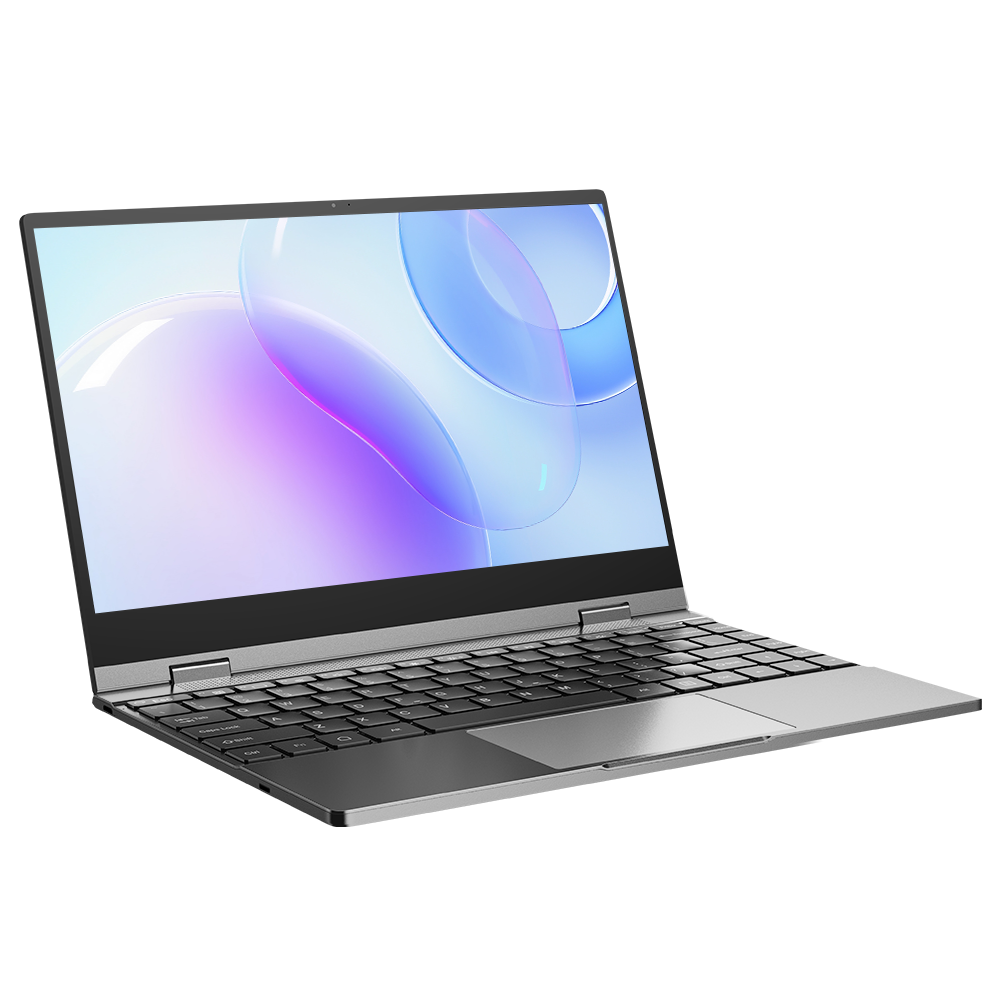
UPERFECT X 14 Lapdock
A practical example of this setup appears in the X 14 Lapdock, offered by UPERFECT. This device includes a 14-inch display, integrated keyboard, responsive trackpad, and built-in battery designed for extended usage.
You connect the lapdock through USB-C, allowing compatible smartphones to run desktop mode on a larger screen. The device supports platforms such as Samsung DeX and other systems that allow video output through USB-C. The lapdock does not contain its own processor, so your smartphone handles computing tasks while the lapdock provides display and input functionality.
Its internal battery powers the screen and can support several hours of use, making it suitable for mobile work environments. The compact design allows you to carry it easily, supporting travel, remote work, and flexible setups.
Why This Setup Appeals to You?
You reduce the number of devices you carry. Instead of managing both a laptop and a phone, you rely on a single primary device supported by a lapdock.
You benefit from:
- Portability without sacrificing usability
- Immediate access to your files and apps
- Continuous internet connectivity through your phone
- A simplified workflow that stays consistent across locations
- This approach fits situations where mobility and efficiency matter.
Where You Can Use This Setup?
Remote Work
You handle emails, documents, and communication tools using a larger display and physical keyboard. This improves accuracy and comfort during longer work sessions.
Travel
You carry less equipment. A smartphone and lapdock replace the need for a traditional laptop, making your setup easier to manage.
Education
You take notes, complete assignments, and access resources using a structured interface without relying on a full computer.
Backup Workspace
You maintain a working system if your main computer becomes unavailable. This setup supports essential tasks without interruption.
Lapdock Setup Compared to a Laptop
A laptop includes its own processor, storage, and operating system. A lapdock setup depends on your smartphone for those functions.
You experience:
- Portability advantages with fewer components
- Performance that depends on your phone’s specifications
- Software compatibility limited to mobile and desktop-mode-supported applications
While laptops handle demanding workloads more effectively, a lapdock setup covers everyday tasks efficiently.
Limitations to Consider
You should understand the boundaries of this system.
- Not all smartphones support desktop mode or video output
- Application performance depends on your device
- Advanced tasks such as heavy editing or development remain limited
- Some applications are not fully optimized for desktop-style environments
These factors determine how well the setup fits your needs.
The Direction of Mobile Computing
Smartphones continue to improve in processing power and software capabilities. Desktop modes become more refined, allowing better multitasking and compatibility.
A lapdock complements this progression by providing the physical interface required for extended use. As mobile devices become stronger, setups that rely on a single device become more practical and efficient.
You move toward a system where your primary device supports multiple roles, and accessories expand its usability.
A Practical Shift Toward Flexible Computing
You do not always need a traditional laptop to complete everyday tasks. A smartphone paired with a lapdock creates a setup that supports productivity, travel, and communication in a compact form. You carry less while maintaining access to essential tools.
Devices such as the X 14 Lapdock offered by UPERFECT provide a structured environment with a 14-inch display, integrated keyboard, trackpad, and battery-powered design. Your smartphone handles computing tasks, while the lapdock delivers the interface needed for extended use.
You gain flexibility without completely replacing a laptop for advanced workloads. This approach supports daily tasks effectively and adapts to changing environments. As mobile technology continues to evolve, setups like this become more relevant, giving you greater control over how and where you work.
Use UPERFECT lapdock to turn your smartphone into a portable workstation. Flexible setup for work, travel, and everyday productivity.
Recent Blogs
-

The Ultimate At-Home Soccer Training Setup: 3 Essentials Every Player Needs
-

Flawless Beauty Essentials: The Natasha Denona Products Worth Adding to Your Makeup Collection
-

The Secret to Invisible Underwear: Finding Styles That Disappear Under Clothes
-

Transform Your Sleep Experience with Origin Mattress
-

Minimal Effort, Maximum Elegance: The Power of Modern Knit & Pleated Silhouettes